Syncing Apple Health data to my AI (Claude Code)
TL;DR: iOS Shortcuts + Cloudflare Worker + GitHub Actions = automatic Apple health data sync. No third-party apps, full control over your data.
When I ask Claude "how's my recovery?" it actually knows: HRV trending up at 53ms, sleep has been short at 6.7 hours, haven't run in 2 days. This comes from Apple Health data synced automatically to my git repo.
Getting here was harder than expected. Apple Health has no API, third-party apps want subscriptions and your data, and manual XML exports get stale before you use them. I wanted something automatic that I actually control.
The solution: iOS Shortcuts can query Health data and make HTTP requests. I pipe that through a Cloudflare Worker to GitHub Actions, which commits the data to my repo. Runs on a schedule, no manual steps.
Claude does have built-in Health connectors, but I wanted more control. Syncing to git gives me something different: the data lives in a folder I own, it correlates with everything else I'm tracking (Strava activities, home air quality, food logs), and I can see exactly what's being stored.
One gotcha I ran into: don't use JSON in iOS Shortcuts. The JSON handling is fragile - newlines in values cause failures. Plain text with section markers is much simpler.
The architecture
iOS Shortcut (iPhone)
    │ Queries Health data
    │ HTTP POST (plain text + location)
    ▼
Cloudflare Worker (webhook)
    │ Validates request
    │ Base64 encodes body
    │ Triggers repository_dispatch
    ▼
GitHub Action (Phase 1: Store)
    │ Decodes payload
    │ Saves to incoming/ folder with unique filename
    │ Commits immediately
    ▼
GitHub Action (Phase 2: Process)
    │ Runs on schedule (or manually)
    │ Processes all pending files
    │ Parses into JSON, generates CSVs
    │ Commits results
    ▼
health/apple-health/parsed/*.json
health/csv/daily-metrics.csv
Why two GitHub Actions instead of one? Concurrency. If sleep data syncs while HRV is still processing, GitHub cancels the pending job. Splitting into "store" (fast, unique files) and "process" (batched, no conflicts) avoids this.
The plain text format
Here's what the plain text format looks like:
SLEEP_DATA
===LOCATION===
LATITUDE: 37.4419
LONGITUDE: -122.1430
CITY: Palo Alto
STATE: CA
ZIP: 94301
REGION: United States
===VALUE===
Core
Deep
Awake
Core
REM
Core
Deep
...
===START_DATE===
Jan 20, 2026 at 12:00 AM
Jan 20, 2026 at 12:18 AM
Jan 20, 2026 at 12:29 AM
...
===END_DATE===
Jan 20, 2026 at 12:18 AM
Jan 20, 2026 at 12:29 AM
Jan 20, 2026 at 12:52 AM
...
Each section (===SECTION===) contains one value per line. The parser matches VALUE[i] with START_DATE[i] and END_DATE[i]. Location data comes along for the ride so the parser can infer timezone.
Building the iOS Shortcut
The shortcut queries Health samples, gets location (for timezone), formats as plain text, and POSTs to the webhook. Here's what mine looks like:
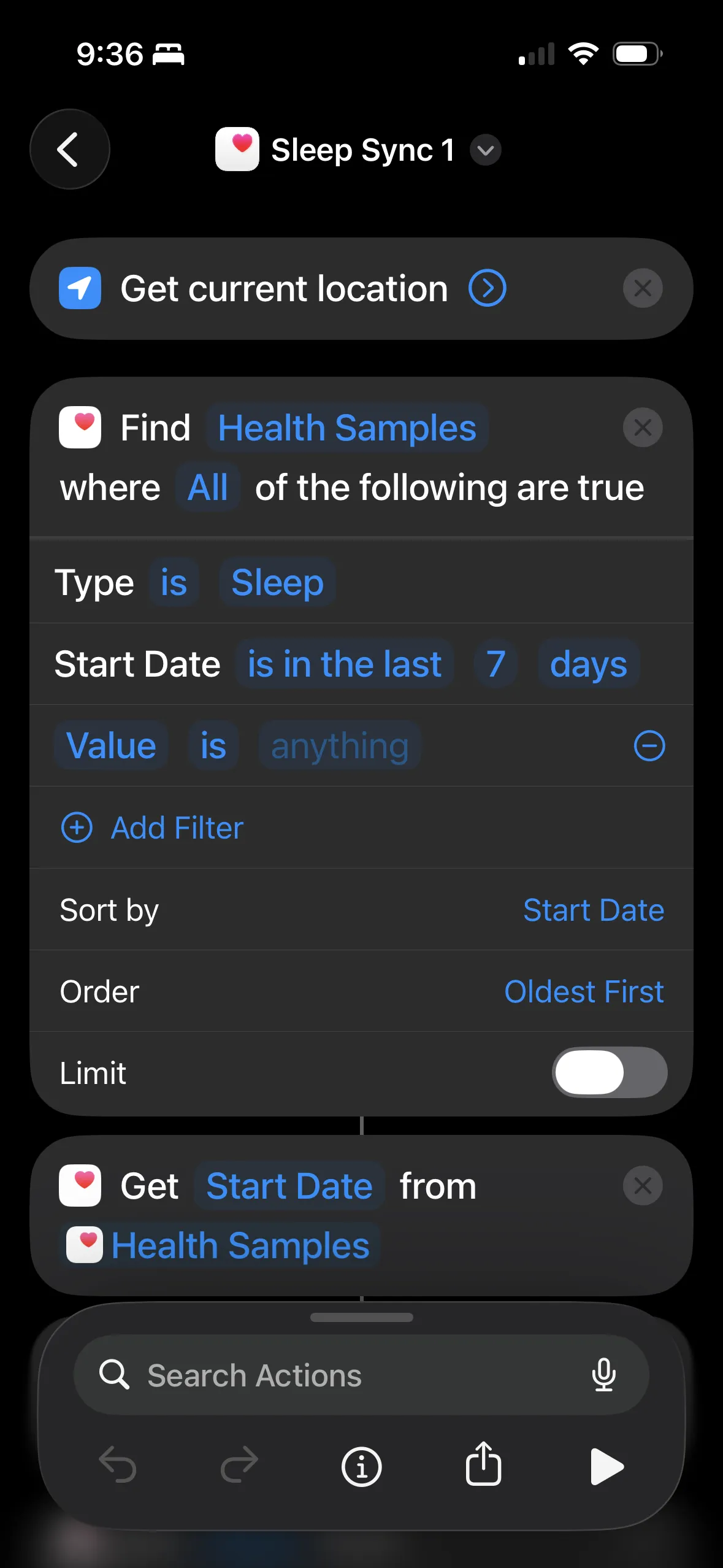
Start with "Find Health Samples" - type Sleep, last 7 days, sorted oldest first. Then "Get Start Date" to extract the field.
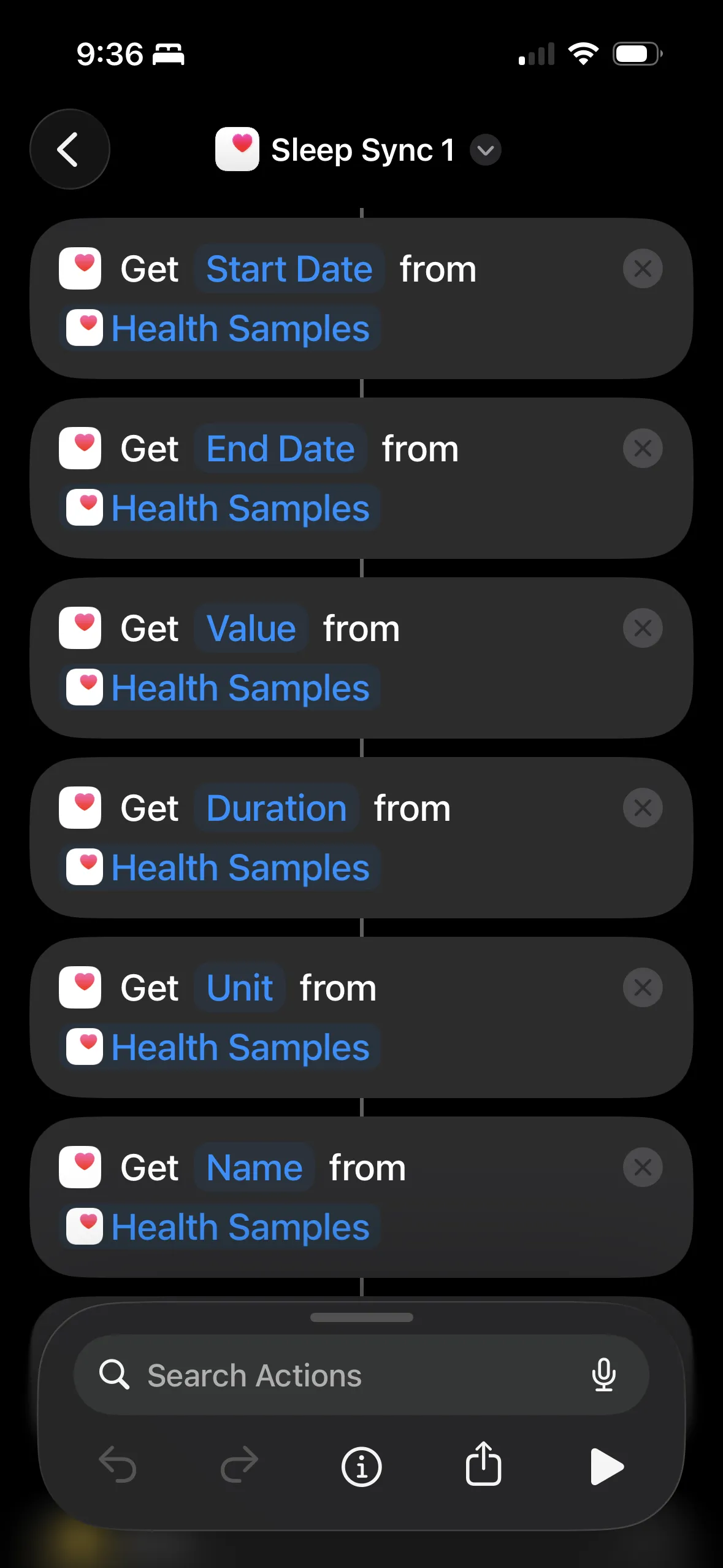
Extract each field separately: Start Date, End Date, Value, Duration, Unit, Name. Each "Get X from Health Samples" returns a list.
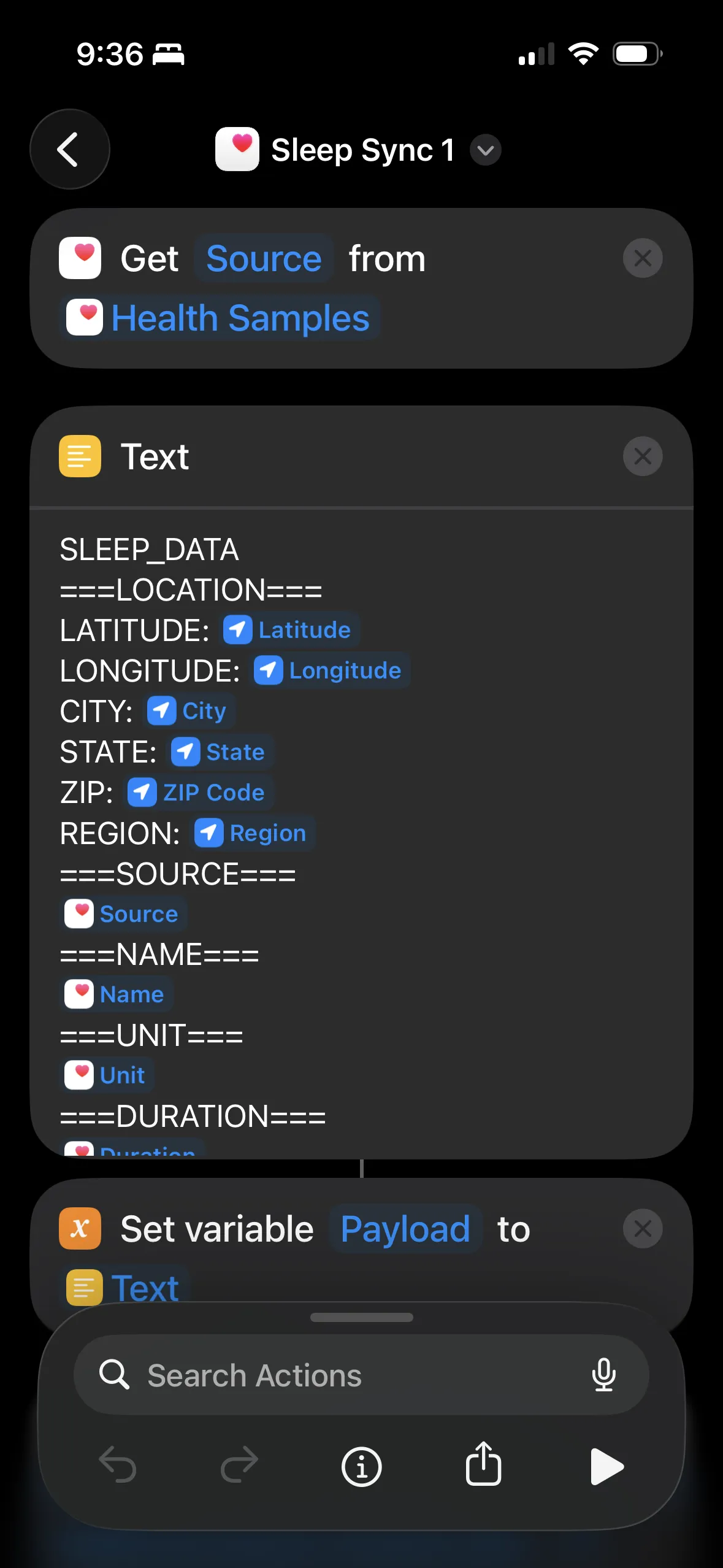
Build the plain text payload with section markers. Variables get inserted as newline-separated lists.
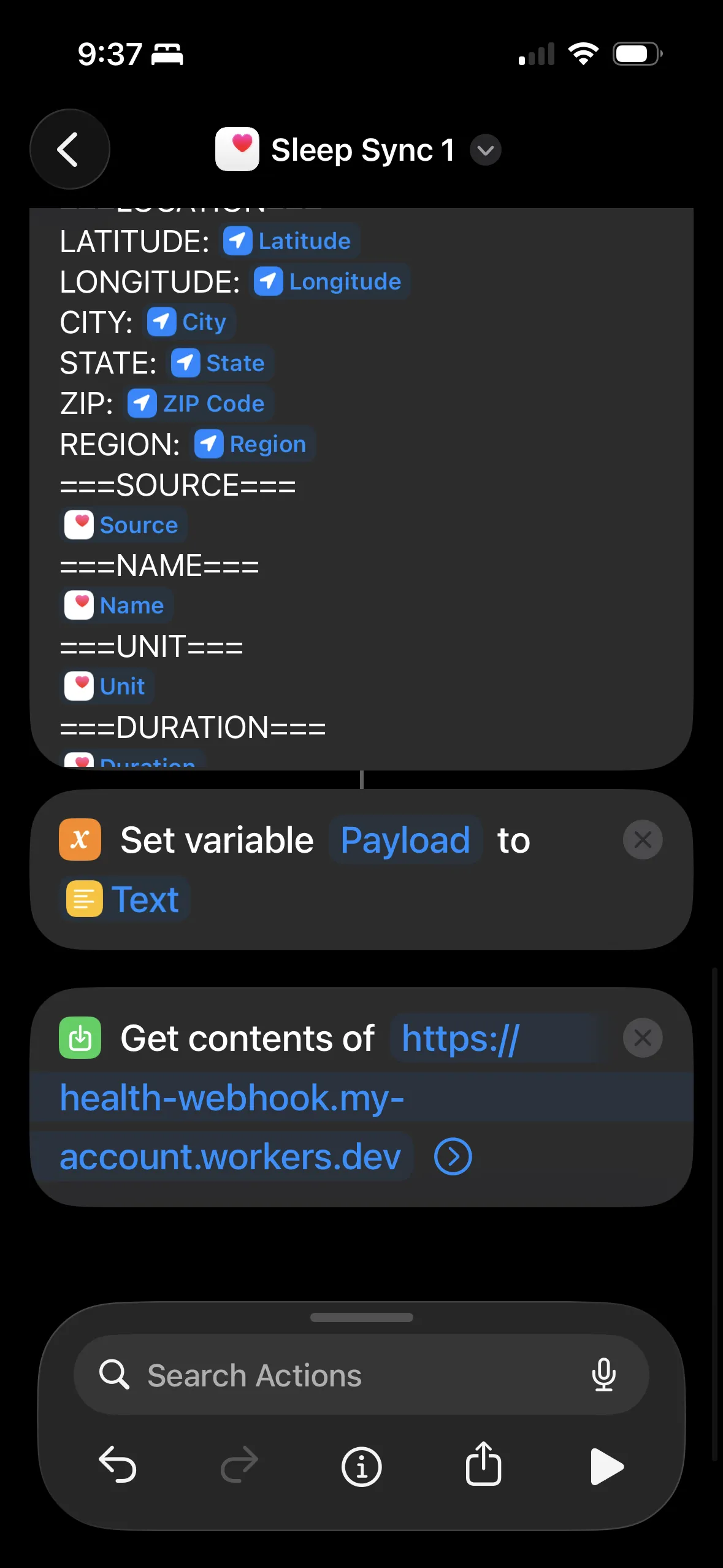
Set the text as a variable, then "Get Contents of URL" to POST it to the Cloudflare Worker. Include an Authorization header with your webhook secret.
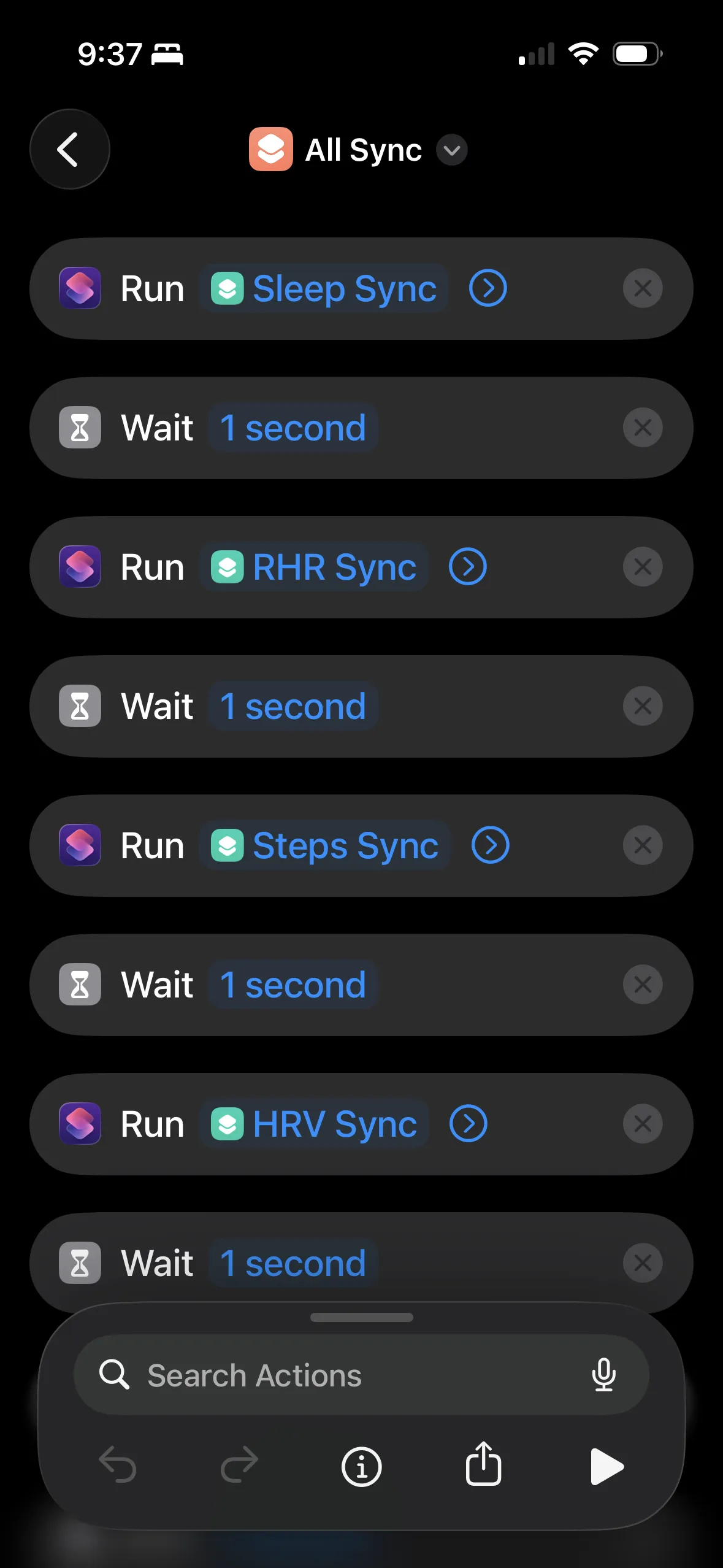
I have a master "All Sync" shortcut that runs each data type with 1-second waits between them.
I ended up with separate shortcuts for each data type (sleep, HRV, resting heart rate, steps, weight, etc.) and a master "All Sync" that runs them in sequence. I trigger it via iOS Automation on a schedule.
The Cloudflare Worker
The worker receives the POST, base64 encodes the body (to preserve newlines through the GitHub API), and triggers a repository_dispatch:
export default {
  async fetch(request, env) {
    if (request.method !== 'POST') {
      return new Response('Method not allowed', { status: 405 });
    }

    // Validate webhook secret
    const authHeader = request.headers.get('Authorization');
    if (authHeader !== `Bearer ${env.WEBHOOK_SECRET}`) {
      return new Response('Unauthorized', { status: 401 });
    }

    const body = await request.text();

    // Base64 encode - critical for preserving newlines
    const encoded = btoa(unescape(encodeURIComponent(body)));

    const response = await fetch(
      `https://api.github.com/repos/${env.GITHUB_OWNER}/${env.GITHUB_REPO}/dispatches`,
      {
        method: 'POST',
        headers: {
          'Authorization': `Bearer ${env.GITHUB_TOKEN}`,
          'Accept': 'application/vnd.github.v3+json',
          'User-Agent': 'apple-health-webhook'
        },
        body: JSON.stringify({
          event_type: 'apple-health-sync',
          client_payload: { data: encoded }
        })
      }
    );

    if (!response.ok) {
      return new Response(`GitHub API error: ${response.status}`, { status: 500 });
    }

    return new Response('OK', { status: 200 });
  }
}
Why not have iOS Shortcuts call GitHub directly? The GitHub PAT token does grant significant access, and it doesn't seem like the Shortcuts app store the headers for secrets in a more protected fashion. It's also really annoying to configure the headers in the Shortcuts app! Setting the custom headers properly was a mess.
The worker needs four secrets: WEBHOOK_SECRET (shared with the iOS Shortcut for auth), GITHUB_TOKEN (a PAT with repo scope), GITHUB_OWNER, and GITHUB_REPO.
GitHub Action: Phase 1 (Store Only)
This workflow runs on every webhook, stores the data immediately, and exits. No processing, no conflicts:
name: Apple Health Webhook (Store Only)

on:
  repository_dispatch:
    types: [apple-health-sync]

permissions:
  contents: write

# Unique concurrency group per run - allows parallel execution
concurrency:
  group: health-store-${{ github.run_id }}
  cancel-in-progress: false

jobs:
  store:
    runs-on: ubuntu-latest
    steps:
      - uses: actions/checkout@v4

      - name: Store raw payload
        run: |
          mkdir -p health/apple-health/incoming

          # Generate unique filename: timestamp_runid_datatype.txt
          TIMESTAMP=$(date -u +%Y%m%d_%H%M%S)
          RUN_ID="${{ github.run_id }}"

          # Decode base64 payload
          echo '${{ github.event.client_payload.data }}' | base64 -d > /tmp/incoming.txt

          # Detect data type from first line
          DATA_TYPE=$(head -1 /tmp/incoming.txt | tr '[:upper:]' '[:lower:]' | sed 's/_data//')

          # Save with unique filename
          FILENAME="${TIMESTAMP}_${RUN_ID}_${DATA_TYPE}.txt"
          mv /tmp/incoming.txt "health/apple-health/incoming/${FILENAME}"

      - name: Commit incoming data
        run: |
          git config user.name "github-actions[bot]"
          git config user.email "github-actions[bot]@users.noreply.github.com"

          git add health/apple-health/incoming/

          if git diff --staged --quiet; then
            echo "No changes to commit"
            exit 0
          fi

          git commit -m "chore: Store incoming Apple Health data"

          # Retry push (unique files = easy rebase)
          for i in 1 2 3 4 5; do
            if git push; then exit 0; fi
            echo "Push failed, retrying..."
            git pull --rebase origin main
          done
          exit 1
Each incoming file has a unique name (timestamp + run ID + data type), so concurrent runs never conflict - they just write different files.
GitHub Action: Phase 2 (Process Pending)
This workflow runs on a schedule, processes all pending files at once:
name: Apple Health Process Pending

on:
  schedule:
    # Twice daily: 8:15am and 10:15pm PST
    - cron: '15 16,6 * * *'
  workflow_dispatch:

permissions:
  contents: write

# Only one processing job at a time
concurrency:
  group: health-process
  cancel-in-progress: false

jobs:
  process:
    runs-on: ubuntu-latest
    steps:
      - uses: actions/checkout@v4

      - name: Check for pending files
        id: check
        run: |
          if [ -d "health/apple-health/incoming" ] && \
             [ "$(ls -A health/apple-health/incoming 2>/dev/null)" ]; then
            echo "has_pending=true" >> $GITHUB_OUTPUT
          else
            echo "has_pending=false" >> $GITHUB_OUTPUT
          fi

      - uses: actions/setup-python@v5
        if: steps.check.outputs.has_pending == 'true'
        with:
          python-version: '3.11'

      - name: Process all pending files
        if: steps.check.outputs.has_pending == 'true'
        run: |
          for file in health/apple-health/incoming/*.txt; do
            if [ -f "$file" ]; then
              # Extract data type from filename
              BASENAME=$(basename "$file" .txt)
              DATA_TYPE=$(echo "$BASENAME" | rev | cut -d'_' -f1 | rev)

              # Copy to raw/ and process
              cp "$file" "health/apple-health/raw/${DATA_TYPE}_latest.txt"
              python scripts/process-apple-health-webhook.py \
                "health/apple-health/raw/${DATA_TYPE}_latest.txt"

              # Remove from incoming
              rm "$file"
            fi
          done

      - name: Commit processed data
        if: steps.check.outputs.has_pending == 'true'
        run: |
          git config user.name "github-actions[bot]"
          git add health/apple-health/
          git diff --staged --quiet || \
            git commit -m "chore: Process Apple Health data"
          git push
The Python parser
The parser handles the plain text format and outputs clean JSON. Here's the core logic:
def parse_sections(raw_text: str) -> dict:
    """Parse raw text into sections dictionary."""
    sections = {}
    current_section = None
    current_lines = []

    for line in raw_text.split('\n'):
        if line.startswith('===') and line.endswith('==='):
            if current_section:
                sections[current_section] = current_lines
            current_section = line.strip('=')
            current_lines = []
        elif current_section and line.strip():
            current_lines.append(line.strip())

    if current_section:
        sections[current_section] = current_lines

    return sections


def parse_date(date_str: str) -> datetime:
    """Parse date like 'Jan 12, 2026 at 12:10 AM'"""
    return datetime.strptime(date_str.strip(), "%b %d, %Y at %I:%M %p")
For sleep data specifically, the parser groups continuous sleep segments into sessions. If there's a gap > 2 hours between segments, it's a new session (handles naps separately from main sleep):
# Group into continuous sleep sessions
sessions = []
current_session = []

for sample in all_samples:
    if not current_session:
        current_session.append(sample)
    else:
        gap = (sample["start"] - current_session[-1]["end"]).total_seconds() / 3600
        if gap > 2:  # More than 2 hour gap = new session
            sessions.append(current_session)
            current_session = [sample]
        else:
            current_session.append(sample)
The parser also infers timezone from the location data (state → timezone mapping) so sleep recorded in California vs Taiwan gets correct timestamps.
What data types to sync
The system supports 11 data types:
| Data Type | What it captures |
|---|---|
SLEEP_DATA |
Sleep stages (deep, REM, core, awake), bed/wake times |
HRV_DATA |
Heart rate variability readings (multiple per day, averaged) |
RHR_DATA |
Resting heart rate (daily) |
STEPS_DATA |
Step counts (summed per day) |
WEIGHT_DATA |
Weight measurements |
EXERCISE_MINUTES_DATA |
Exercise minutes from workouts |
WALK_RUN_DISTANCE_DATA |
Walking + running distance |
BLOOD_OXYGEN_DATA |
SpO2 readings (grouped by sleep night) |
RESPIRATORY_RATE_DATA |
Breathing rate during sleep |
ACTIVE_ENERGY_DATA |
Calories burned from activity |
RESTING_ENERGY_DATA |
Basal metabolic rate calories |
I have a separate iOS Shortcut for each data type. They all use the same webhook - the parser routes based on the first line.
CSV generation for Claude
JSON is verbose. I generate CSVs so Claude can read more data in fewer tokens:
def generate_daily_metrics_csv():
    """Combined daily snapshot - the main file for Claude."""
    # Load all sources
    sleep = json.load(open("health/apple-health/parsed/sleep.json"))
    hrv = json.load(open("health/apple-health/parsed/hrv.json"))
    rhr = json.load(open("health/apple-health/parsed/resting_heart_rate.json"))
    steps = json.load(open("health/apple-health/parsed/steps.json"))

    # Join into one row per day
    rows = []
    for date in all_dates:
        rows.append({
            "date": date,
            "sleep_total": sleep.get(date, {}).get("total_hours", ""),
            "sleep_deep": sleep.get(date, {}).get("stages", {}).get("AsleepDeep", ""),
            "hrv_ms": hrv.get(date, {}).get("average_ms", ""),
            "rhr_bpm": rhr.get(date, {}).get("bpm", ""),
            "steps": steps.get(date, {}).get("steps", ""),
        })

    # Write CSV
    with open("health/csv/daily-metrics.csv", "w") as f:
        writer = csv.DictWriter(f, fieldnames=rows[0].keys())
        writer.writeheader()
        writer.writerows(rows)
One CSV file instead of 6 JSON files, with headers defined once instead of repeated per row - Claude can read weeks of health data in a fraction of the tokens.
The fitness summary
All this data feeds into an auto-generated markdown report:
## Recovery Metrics (7-day avg)

- **HRV:** 53 ms (stable)
- **Resting HR:** 62 bpm (↓ improving)
- **Sleep:** 6.7 hrs
- **Blood Oxygen:** 96.1% avg
- **Weight:** 166 lbs, -1.7 lbs

### HRV Trend (last 7 days)
Jan 21: 42 ████
Jan 22: 45 █████
Jan 23: 52 ██████
Jan 24: 48 █████
Jan 25: 55 ██████
Jan 26: 51 █████
Jan 27: 49 █████
The report includes 12-week trends, ASCII charts, and automated observations. Claude reads this at session start and can give me a meaningful health summary.
What this actually looks like
After a bad night, Claude tells me:
"Rough night - only 5.5 hours of sleep, and your HRV dropped to 38. Resting HR is up too. Might be worth taking it easy today."
This is the part that makes the whole pipeline worth it: I actually know how I'm recovering now, instead of just collecting data.
Gotchas and tips
iOS Shortcuts has size limits - long health exports can fail. Syncing 7 days of sleep data works; 30 days might not. I break data into separate syncs by type.
Base64 encoding is essential because the GitHub repository_dispatch API mangles certain characters (newlines, special chars). Base64 preserves everything through the chain.
Timezone handling is tricky - sleep data recorded in Taipei shouldn't show as 3 AM California time. Include location in the payload and infer timezone from state/region:
US_TIMEZONES = {
    'CA': ('America/Los_Angeles', '-08:00'),
    'NY': ('America/New_York', '-05:00'),
    # ...
}
Concurrency kills single-workflow designs - if sleep and HRV sync at the same time, one gets cancelled. The two-phase architecture (store → process) avoids this.
JSON in Shortcuts is fragile - I couldn't get it to work reliably. Plain text with section markers (===NAME===) is much simpler.
Watch for duplicate data - both iPhone and Apple Watch record steps. The parser deduplicates by time range, keeping the higher value (Watch is usually more accurate).
File structure when it's working
health/
├── apple-health/
│   ├── incoming/          # Pending files (cleared after processing)
│   ├── raw/               # Latest raw data per type
│   │   ├── sleep_latest.txt
│   │   ├── hrv_latest.txt
│   │   └── ...
│   ├── parsed/            # Processed JSON (source of truth)
│   │   ├── sleep.json
│   │   ├── hrv.json
│   │   ├── resting_heart_rate.json
│   │   ├── steps.json
│   │   └── ...
│   └── sync_metadata/     # Per-type sync tracking
├── csv/                   # Generated CSVs for Claude
│   ├── daily-metrics.csv  # Main file - combined daily snapshot
│   ├── sleep.csv
│   ├── hrv.csv
│   └── ...
└── reports/
    └── fitness-summary.md # Auto-generated narrative report
Claude reads csv/daily-metrics.csv and reports/fitness-summary.md. Everything else is implementation detail.
And of course, Claude wrote all the code - the Cloudflare Worker, the GitHub Actions, the Python parsers - with some help and iteration from me.
Previous: The instruction that turns Claude into a self-improving system